Chrome extension · Search & category export
Turn Trustpilot search and category pages into lead-ready spreadsheets
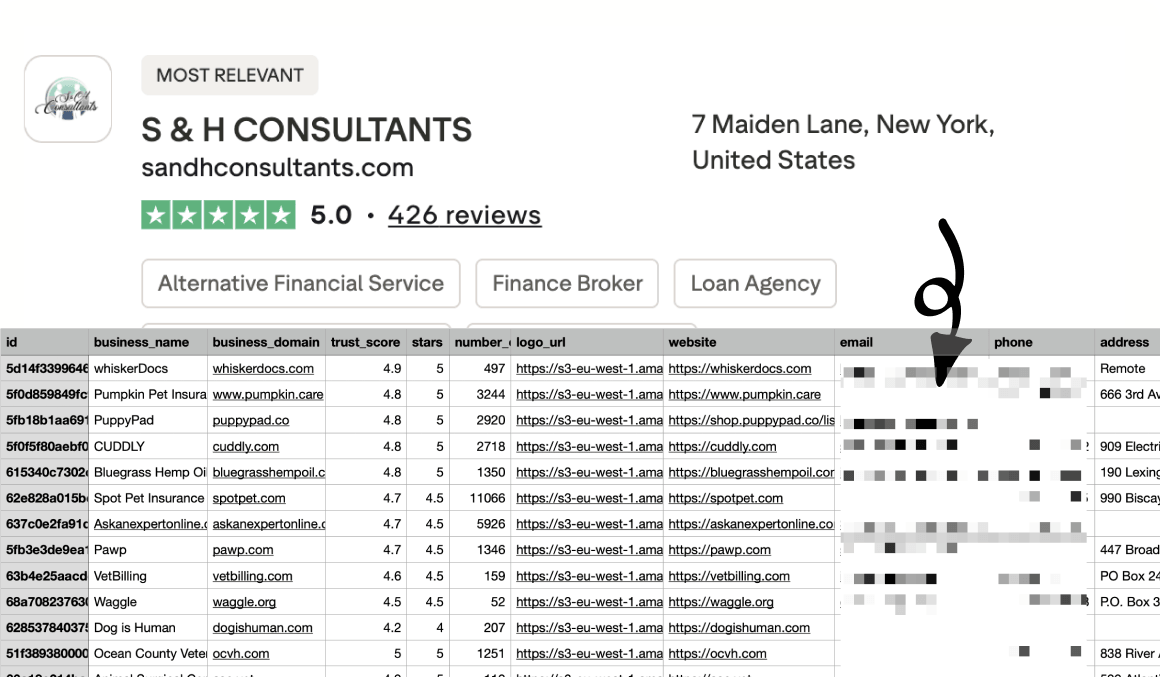
Export businesses with trust scores, contact details, and categories—your page filters apply automatically. Download CSV, Excel, or JSON in one click.
Built for sales teams, lead gen agencies, market researchers, and BD teams who need structured business lists—not manual copy-paste from search results.
Built for teams that work from Trustpilot lists
Whether you prospect, research, or partner—get from filtered Trustpilot results to a usable file in minutes.
B2B sales & SDR
Build prospect lists from Trustpilot search by keyword or category—trust scores, websites, and contact details in one export.
Lead gen agencies
Deliver client-ready lead files from filtered Trustpilot pages without re-applying filters manually in a spreadsheet.
Market research
Map competitors and category players with trust scores, review counts, and categories—ready for pivot tables and BI tools.
BD & partnerships
Find high-rated businesses in a niche or region, export trustpilot_url and website for outreach workflows.
Everything you need for business list exports
One extension for lead gen, competitive mapping, and outreach prep—structured the way analysts actually work.
Search & category pages
Export businesses from Trustpilot search results and category listing pages—the listings you already filtered on the site.
Filters stay applied
Rating, location, category, and other filters you set on Trustpilot are reflected in what gets exported—no second pass in Excel.
20 business fields
Each row includes trust score, reviews, website, email, phone, address, categories, and trustpilot_url in one flat file.
CSV, Excel, or JSON
Choose the format that fits your CRM, outreach stack, or data pipeline—download in one click from the extension.
All regional Trustpilot sites
Same workflow on trustpilot.com, uk.trustpilot.com, de.trustpilot.com, and every supported country domain.
Runs in your browser
Business data is processed locally in Chrome. Your export is not uploaded to NioMaker servers during the scrape.
20 fields in every export
Identity, reputation, contact details, and categories—one row per business for CRM import, outreach, and analysis.
Business identity
Core company identifiers and links from the listing.
- id
- business_name
- business_domain
- logo_url
- website
- trustpilot_url
Reputation
Trustpilot scores and review volume for each business.
- trust_score
- stars
- number_of_reviews
Contact & location
Reach-out and address fields when available on the profile.
- phone
- address
- city
- zip_code
- country
Classification & context
Categories and how the business was found on Trustpilot.
- categories
- primary_category
- category_id
- source_type
- search_query
Questions about field coverage? Check the FAQ or email help@niomaker.com.
All Trustpilot country sites
Export from any supported regional domain—the same extension and fields everywhere you research.
Global & English
- trustpilot.comUnited States / Global
- uk.trustpilot.comUnited Kingdom
- ca.trustpilot.comCanada
- au.trustpilot.comAustralia
- ie.trustpilot.comIreland
- nz.trustpilot.comNew Zealand
Europe
- de.trustpilot.comGermany
- fr.trustpilot.comFrance
- it.trustpilot.comItaly
- es.trustpilot.comSpain
- nl.trustpilot.comNetherlands
- dk.trustpilot.comDenmark
- se.trustpilot.comSweden
- no.trustpilot.comNorway
- fi.trustpilot.comFinland
- pl.trustpilot.comPoland
- at.trustpilot.comAustria
- ch.trustpilot.comSwitzerland
Americas & Asia-Pacific
- jp.trustpilot.comJapan
- br.trustpilot.comBrazil
Global & English 6 sites
- trustpilot.comUnited States / Global
- uk.trustpilot.comUnited Kingdom
- ca.trustpilot.comCanada
- au.trustpilot.comAustralia
- ie.trustpilot.comIreland
- nz.trustpilot.comNew Zealand
Europe 12 sites
- de.trustpilot.comGermany
- fr.trustpilot.comFrance
- it.trustpilot.comItaly
- es.trustpilot.comSpain
- nl.trustpilot.comNetherlands
- dk.trustpilot.comDenmark
- se.trustpilot.comSweden
- no.trustpilot.comNorway
- fi.trustpilot.comFinland
- pl.trustpilot.comPoland
- at.trustpilot.comAustria
- ch.trustpilot.comSwitzerland
Americas & Asia-Pacific 2 sites
- jp.trustpilot.comJapan
- br.trustpilot.comBrazil
How Trustpilot Business Scraper works
Three steps from install to a structured business list.
Install the extension
Add Trustpilot Business Scraper from the Chrome Web Store or load the ZIP in developer mode.
Open search or a category page
Run a search or browse a category on any Trustpilot site, then apply the filters you need (rating, location, etc.).
Export your list
Click Export, pick CSV, Excel, or JSON, and download a structured file ready for your workflow.
Example category page: trustpilot.com/categories/finance
Simple pricing for business exports
Start free with 40 business records, then upgrade for unlimited exports. Cancel anytime.
Free
Try exports on real Trustpilot search and category pages before you scale.
- Up to 40 business records per export
- Search and category page exports
- Page filters applied automatically
- All 20 fields · CSV, Excel, or JSON
- All Trustpilot country sites supported
Pro
For teams that export business lists regularly for lead gen, research, and outreach.
- Unlimited business exports
- Everything in Free, without the 40-record cap
- Search, category pages, and all regional sites
- Priority support from the NioMaker team
- Updates included while subscribed
Ready to export your next business list?
Install Trustpilot Business Scraper and move Trustpilot search results into your stack without the copy-paste tax.
Get Trustpilot Business ScraperFrequently asked questions
Which Trustpilot pages are supported?
Use the extension on Trustpilot search results and category listing pages on any regional domain (e.g. www.trustpilot.com, uk.trustpilot.com, de.trustpilot.com). It exports the businesses shown in those listings, not individual review threads.
Do my Trustpilot filters carry over to the export?
Yes. Filters you apply on the page—such as star rating, location, or category—are respected when you export, so the file matches what you see in the results.
What export formats are available?
You can download your data as CSV, Excel (.xlsx), or JSON from the extension popup.
What does the free plan include?
Free accounts can export up to 40 business records per export. All 20 fields and export formats are included. Upgrade to Pro for unlimited exports—see the Pricing section below.
Is Trustpilot Business Scraper affiliated with Trustpilot?
No. Trustpilot Business Scraper is built by NioMaker and is not endorsed by or affiliated with Trustpilot. Trademarks belong to their respective owners.
What should I know about terms of use?
You are responsible for complying with Trustpilot’s terms of service, applicable laws, and any agreements that govern your access to business listing data. Use the extension only for scenarios you are authorized to export.
Do you store the data I export?
This website does not run the export for you—the extension operates in your browser. See our Privacy Policy and the Chrome listing for how NioMaker handles account or support-related data.
How do I upgrade or see plans?
See the Pricing section on this page for plan details and upgrade options.